Are you tired of the endless back-and-forth emails just to find a time that works for everyone? With calendar booking software, you can let clients book meetings instantly based on your availability, no hassle, no confusion.
That’s exactly what calendar booking software like Tidycal offers. With Tidycal, you can sync your calendars, set your availability, and share a clean, easy-to-use booking page that fits your style. No more double bookings, no more missed appointments, and no more wasted time.
Ready to take control of your schedule and impress your clients with effortless booking? Keep reading to discover how Tidycal can transform the way you manage your meetings.
Introduction To Calendar Booking Software
Calendar booking software simplifies scheduling by managing appointments automatically. It helps users share availability and avoid back-and-forth emails. This software suits professionals, businesses, and teams needing smooth meeting setups.
Many tools exist, such as Google Calendar, Calendly, and Acuity Scheduling. Each offers features that save time and reduce scheduling errors. Understanding their purpose and benefits clarifies why smart scheduling is vital for efficiency.
What Is Calendar Booking Software And Its Purpose
Calendar booking software is a digital tool that manages meeting times and appointment bookings. It connects with your calendar to show real-time availability.
- Purpose: To automate scheduling and eliminate manual tasks.
- Users: Businesses, freelancers, and teams.
- Benefits: Reduced no-shows, streamlined communication, and better time management.
Popular examples include:
| Software | Main Feature | Best For |
|---|---|---|
| Calendly | Automated scheduling with free and paid plans | Individuals and small teams |
| Google Calendar | Integrated booking within the Google ecosystem | Users of Google services |
| Acuity Scheduling | Website integration and automated reminders | Businesses needing robust features |
| Setmore | Highly customizable booking system | Businesses requiring tailored solutions |
How Smart Scheduling Boosts Efficiency
Smart scheduling saves time by automating appointment management. It reduces errors and ensures meetings fit your calendar perfectly.
Key ways smart scheduling boosts efficiency:
- Two-way calendar integration: Updates availability instantly across platforms.
- Automated reminders: Send notifications to reduce no-shows.
- Custom booking pages: Let clients book easily without confusion.
- Real-time availability: Prevents double bookings and conflicts.
Using tools like Tidycal ensures a smooth booking experience by combining these features. This leads to better time use and fewer scheduling headaches.
Key Features That Make Calendar Booking Software Unique
Calendar booking software simplifies appointment scheduling by offering smart features. These features help avoid conflicts and improve communication. They save time for both businesses and clients. Each feature works together to create a smooth scheduling experience.
Two-way Calendar Integration: Preventing Double-bookings Seamlessly
Two-way calendar integration connects your booking software with calendars like Google Calendar or Microsoft Outlook. It keeps both calendars updated instantly. This stops double-bookings and scheduling conflicts.
When a client books an appointment, the software blocks that time in your calendar. If you manually add an event, the booking tool knows and blocks that slot from being booked.
- Syncs events in real-time
- Supports multiple calendar types
- Prevents overlapping appointments
Automated Notifications And Reminders To Reduce No-shows
Automatic notifications keep clients informed about their appointments. This reduces no-shows and last-minute cancellations.
Clients receive reminders by email or SMS. These reminders can be customized with details like date, time, and location.
- Pre-scheduled reminders before appointments
- Follow-up messages after meetings
- Option to confirm or cancel easily
Customizable Booking Pages For Branding And Clarity
Booking pages can be tailored to match your brand and style. This creates a professional look and builds trust with clients.
Customization options include:
- Adding logos and colors
- Custom text and instructions
- Multiple booking types or services
A clear booking page helps clients understand available options and book quickly.
Real-time Availability Management For Accurate Scheduling
Real-time availability shows the exact open slots to clients. This helps avoid confusion or double bookings.
The system updates instantly when new appointments are made or canceled.
| Feature | Benefit |
|---|---|
| Live calendar updates | Clients see up-to-date availability |
| Instant booking confirmation | Reduces wait time for clients |
| Automatic slot blocking | Prevents overlapping appointments |
Client Self-service: Empowering Users To Manage Appointments
Clients can book, reschedule, or cancel appointments by themselves. This freedom lowers your workload and improves customer satisfaction.
Self-service features include:
- Easy online booking
- Simple rescheduling options
- Instant cancellation with confirmation
Clients appreciate the control and flexibility to manage their meetings.
Business Tool Integration For Streamlined Workflows
Calendar booking software connects with other business tools to save time and reduce errors.
Common integrations include:
- Email platforms (e.g., Gmail, Outlook)
- Payment gateways (e.g., Stripe, PayPal)
- CRM systems (e.g., Salesforce, HubSpot)
These integrations help automate tasks such as sending invoices or updating client records.
Popular Calendar Booking Software Options
Calendar booking software simplifies scheduling by managing appointments and availability. These tools save time and reduce booking conflicts. Many popular options offer features like calendar syncing, automated reminders, and customizable booking pages. The following software options stand out for their ease of use and powerful scheduling capabilities.
Calendly: User-friendly Automation With Flexible Plans
Calendly is known for its simple interface and smart automation. It offers both free and paid plans to suit different needs.
- Easy setup and quick scheduling links
- Automated notifications and reminders
- Integrates with Google, Outlook, and other calendars
- Customizable availability and meeting types
This software suits individuals and teams wanting a hassle-free scheduling experience.
Google Calendar: Free, Integrated Scheduling Solution
Google Calendar provides a free and easy way to schedule appointments. It integrates directly with Gmail and other Google services.
- Create shareable booking pages within Google Calendar
- Syncs automatically across devices
- Supports event reminders and notifications
- Accessible from any web browser or mobile app
This tool works well for users who want simple scheduling without extra cost.
Microsoft Bookings: Built-in Microsoft Ecosystem Integration
Microsoft Bookings fits perfectly into the Microsoft 365 environment. It helps businesses manage appointments with ease.
- Integration with Outlook and Teams
- Custom booking pages for clients
- Automatic calendar updates
- Supports staff scheduling and services
Ideal for businesses already using Microsoft apps for work.
Acuity Scheduling: Robust Management And Website Integration
Acuity Scheduling offers strong features for managing appointments and clients. It integrates well with business websites.
- Syncs with multiple calendars
- Customizable intake forms and reminders
- Accepts payments during booking
- Supports group and individual appointments
Great for businesses needing detailed booking management and client communication.
Setmore: Highly Customizable Booking System
Setmore allows deep customization of booking pages and workflows. It supports various business needs.
- Supports multiple staff and services
- Custom booking widgets for websites
- Automated email and SMS reminders
- Integration with payment gateways
Perfect for businesses requiring flexible scheduling options and branding.
Square Appointments: Mobile-friendly With Point-of-sale Features
Square Appointments combines scheduling with payment processing. It is mobile-friendly and suits retail or service businesses.
- Booking and payment in one app
- Works smoothly on phones and tablets
- Automatic reminders and calendar sync
- Supports no-show protection with deposits
Best for businesses that need integrated sales and appointment tools.
Pricing And Affordability Breakdown
The cost of calendar booking software varies widely. Prices depend on features, user limits, and support levels. Understanding pricing helps you choose the best option for your needs.
Free Vs. Paid Plans: What To Expect
Many calendar booking tools offer free plans with basic features. These plans usually include:
- Limited number of bookings per month
- Basic calendar integration
- Simple booking pages
- Standard email notifications
Paid plans add more value through:
- Unlimited bookings
- Multiple calendar connections
- Custom branding options
- Automated reminders via email and SMS
- Advanced analytics and reporting
Free plans suit individuals or small teams with simple scheduling needs. Paid plans fit businesses needing more control and customization.
Value Offered By Different Pricing Tiers
| Pricing Tier | Key Features | Ideal For |
|---|---|---|
| Free | Basic booking page, limited appointments, one calendar sync | Solo users, small projects |
| Basic Paid | More appointments, multiple calendars, email reminders | Freelancers, small businesses |
| Pro/Business | Custom branding, SMS reminders, team scheduling, integrations | Growing businesses, teams |
| Enterprise | Advanced security, API access, priority support, custom workflows | Large organizations |
Higher tiers offer increased flexibility and better support. Businesses should match features with their growth stage.
Cost Considerations For Small Businesses And Enterprises
Small businesses benefit from affordable plans with essential features. Look for:
- Easy setup and use
- Good calendar integrations
- Automated reminders to reduce no-shows
Enterprises need advanced options like:
- Team-wide scheduling
- Custom workflows and security
- Dedicated support
Choosing the right plan prevents overspending. Focus on features that improve efficiency and client experience.
Pros And Cons Based On Real-world Usage
Calendar booking software has become essential for managing appointments efficiently. Users experience both clear benefits and some challenges. Understanding these real-world advantages and limitations helps choose the right tool.
Advantages Of Using Calendar Booking Software
- Time-saving automation: Automatically schedules meetings without back-and-forth emails.
- Real-time availability: Shows open slots instantly, reducing double bookings.
- Easy sharing: Booking links can be shared via email or websites.
- Automated reminders: Send notifications to reduce no-shows.
- Integration: Syncs with calendars like Google Calendar and Microsoft Outlook.
- Customizable booking pages: Users can tailor forms to collect necessary info.
- Improved client experience: Clients book appointments at their convenience.
Common Limitations And Challenges
Despite many benefits, some limitations exist:
- Learning curve: New users may find the setup confusing at first.
- Integration limits: Not all software syncs with every calendar app.
- Pricing: Advanced features often require paid plans.
- Customization restrictions: Some tools limit how much you can adjust booking pages.
- Internet dependency: Requires a stable internet connection to function properly.
- Notification overload: Too many reminders can annoy users.
User Feedback And Performance Insights
| Aspect | Positive Feedback | Negative Feedback |
|---|---|---|
| Ease of Use | Intuitive interfaces, quick setup for common tasks. | Advanced settings can be complex for beginners. |
| Reliability | Consistent syncing with calendars, minimal downtime. | Occasional syncing delays are reported during peak hours. |
| Customer Support | Responsive teams, helpful guides, and tutorials. | Support response time is slower on free plans. |
| Value for Money | Free versions are sufficient for small users, and affordable upgrades are available. | Some features are locked behind higher-priced tiers. |
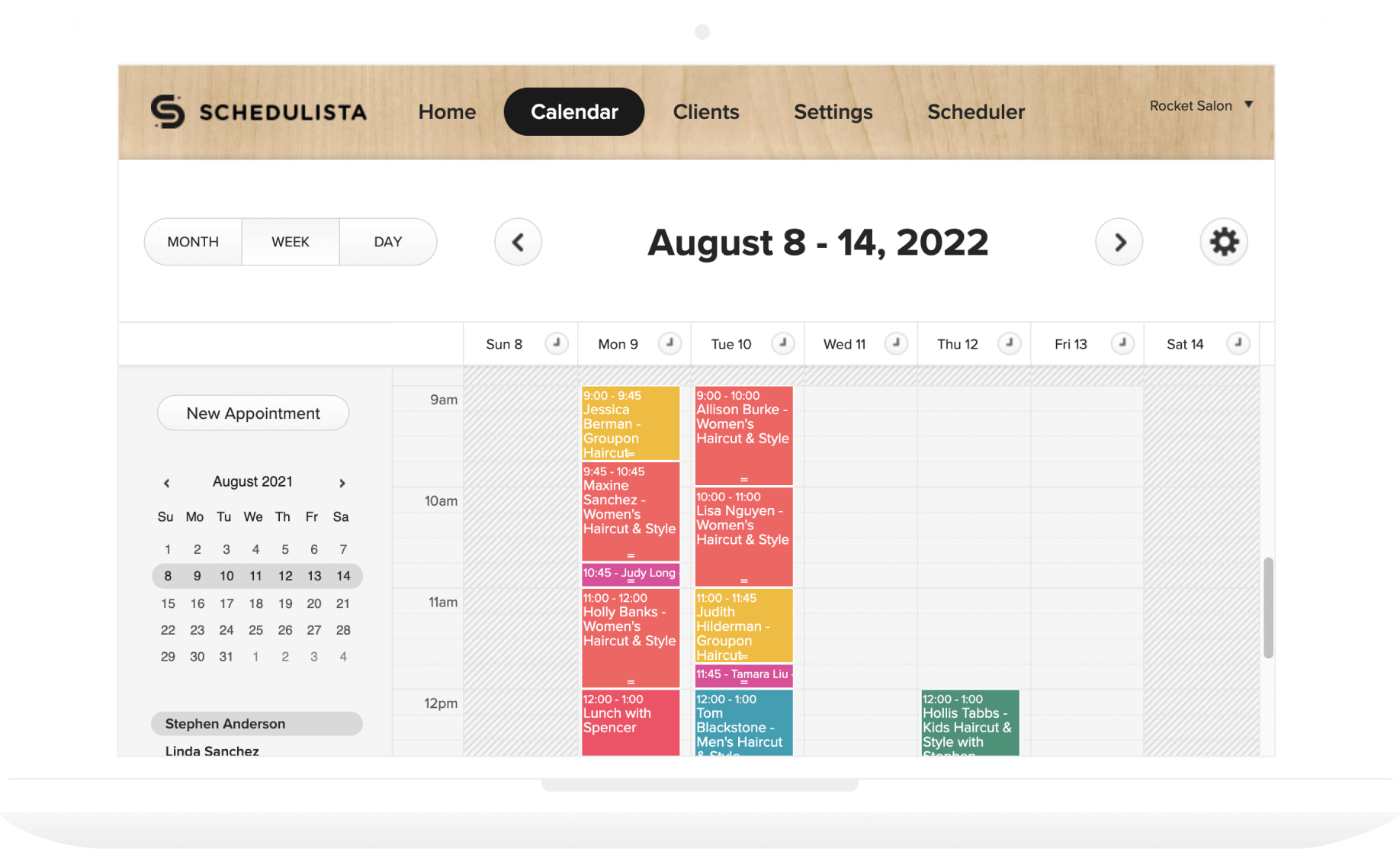
Users of tools like Tidycal highlight its simplicity and smooth booking process. It offers key features like calendar syncing and customizable pages with minimal hassle. Some users desire more advanced customization and integrations.
Credit: www.schedulista.com
Ideal Users And Scenarios For Calendar Booking Software
Calendar booking software fits many users who need to manage appointments efficiently. It simplifies scheduling by showing real-time availability. This saves time and avoids double bookings. Different professions benefit from such tools in unique ways. Understanding who gains the most helps choose the right software.
Small Business Owners And Freelancers
Small business owners and freelancers juggle many tasks. They need a simple way to schedule meetings without back-and-forth emails. Calendar booking software offers:
- Easy setup of available time slots
- Automated booking confirmations and reminders
- Integration with popular calendars like Google Calendar
- Customizable booking pages to reflect brand identity
This reduces scheduling stress and improves client experience. Freelancers, especially, benefit from flexible booking that fits varied work hours.
Healthcare And Wellness Professionals
Healthcare and wellness experts rely on timely appointments. Calendar booking tools help by:
- Allowing patients to book slots online anytime
- Sending automatic reminders to reduce no-shows
- Syncing with existing calendars for seamless management
- Handling multiple staff schedules in one platform
This results in smoother patient flow and better time use. Therapists, dentists, and fitness trainers find these features essential.
Educational And Training Services
Educators and trainers schedule classes, workshops, and sessions often. Calendar booking software supports them with:
- Group session bookings and individual appointments
- Automated notifications for upcoming classes
- Easy rescheduling options for students
- Integration with online meeting tools
It simplifies managing multiple students and courses. Trainers save time on administration and focus more on teaching.
Sales Teams And Customer Support
Sales and support teams need quick, reliable scheduling. Booking software offers:
- Real-time availability sharing across team members
- Booking links that clients can access 24/7
- Automatic reminders to reduce missed calls
- Tracking of meeting history for better customer insights
This leads to faster response times and improved client relationships. Teams stay organized and efficient.
Mobile-first Businesses And On-the-go Scheduling
Businesses that operate mostly on mobile devices benefit greatly. Features include:
- Mobile-friendly booking interfaces
- Instant notifications on smartphones
- Easy calendar syncing across devices
- Ability to manage bookings anytime, anywhere
Mobile-first tools suit consultants, event planners, and remote teams. They keep scheduling flexible and accessible options on the move.
Conclusion: Maximizing Efficiency With Smart Scheduling
Smart scheduling tools simplify appointment management and boost productivity. They help avoid double bookings and reduce no-shows. Using calendar booking software like Tidycal streamlines meeting organization for individuals and businesses. This saves time and improves communication with clients or team members.
Summary Of Key Benefits
- Time-saving: Automates appointment booking and reduces back-and-forth emails.
- Convenience: Offers 24/7 access to scheduling via customizable booking pages.
- Integration: Syncs with popular calendars like Google Calendar and Microsoft Outlook to avoid conflicts.
- Reminders: Sends automated notifications to lower missed appointments.
- Customization: Let users tailor booking options to fit their specific needs.
Choosing The Right Software For Your Needs
Select software based on your appointment volume, industry, and required features. Consider these factors:
| Feature | Why It Matters | Example Tools |
|---|---|---|
| Calendar Integration | Prevents double bookings and syncs schedules in real-time. | Google Calendar, Microsoft Bookings, Tidycal |
| Automated Reminders | Reduces no-shows and keeps clients informed. | Acuity Scheduling, Setmore |
| Customization Options | Matches your branding and specific booking rules. | Setmore, Tidycal |
| Pricing Model | Fits your budget with free or paid plans. | Calendly, Tidycal |
Next Steps To Implementing An Effective Booking System
- Assess your scheduling needs: Determine appointment types and frequency.
- Compare software options: Review features, pricing, and user reviews.
- Set up your booking page: Customize availability, services, and branding.
- Integrate calendars: Link your calendar to sync appointments automatically.
- Test the system: Book trial appointments to ensure smooth operation.
- Train your team: Share guidelines to manage bookings efficiently.
Implementing a smart booking system like Tidycal helps maximize your time. It improves scheduling accuracy and client experience. Start simple and expand features as your needs grow.

Credit: www.skedda.com
Frequently Asked Questions
What Is Calendar Booking Software?
Calendar booking software helps users manage and share their availability. It automates scheduling meetings and appointments seamlessly, reducing manual coordination.
How Does Calendar Booking Software Prevent Double Bookings?
It syncs your availability with existing calendars like Google Calendar and Outlook. This two-way integration ensures no overlapping or double-booked appointments occur.
Which Features Are Essential In Booking Software?
Look for two-way calendar sync, automated reminders, customizable booking pages, real-time availability, and client self-service options. These features enhance user experience and efficiency.
Can Clients Reschedule Appointments Themselves?
Yes, client self-service allows users to book, reschedule, or cancel appointments independently. This reduces administrative workload and improves customer satisfaction.
Conclusion
Choosing the right calendar booking software helps save time and avoid scheduling errors. Tools like Tidycal offer easy calendar syncing and automated reminders. Clients can book appointments anytime without calls or emails. Custom booking pages make your scheduling look professional.
Managing meetings becomes simple and organized. A reliable booking system improves your daily workflow. Try Tidycal to keep your schedule neat and hassle-free.