
Your email signature is more than just your name and contact details—it’s a powerful tool to make a lasting impression every time you hit send. With ThriveDesk Email Signature, you can create a sleek, professional signature quickly and easily, without any complicated steps.
Whether you want to showcase your brand, share your social links, or add a personal touch, this free, privacy-focused generator has you covered. Ready to transform your emails into smart marketing opportunities? Keep reading to discover how ThriveDesk can make your email signature stand out and work harder for you.
Introduction To Thrivedesk Email Signature
ThriveDesk Email Signature offers a simple way to create professional email signatures. It helps businesses and individuals add a personal touch to every email. This tool is free and easy to use. It supports many popular email clients like Gmail, Outlook, Apple Mail, and Yahoo Mail.
With ThriveDesk, users can design a clean, branded signature without worrying about data privacy. No data capture happens during creation. The signature can be copied and quickly added to any email platform. This boosts brand visibility and trust with every message sent.
What Is Thrivedesk Email Signature?
ThriveDesk Email Signature is a free online generator that creates custom email signatures. It lets you type or draw a digital signature and customize the design. The tool is cloud-based and does not store any user data.
Key features include:
- Easy-to-use interface for quick signature creation
- Compatibility with major email clients
- Privacy-focused with no data capture
- Ability to download or copy the signature instantly
This tool is ideal for professionals, small businesses, and teams wanting consistent email branding without hassle.
Purpose And Importance Of Email Signatures In Branding
Email signatures serve as a digital business card at the end of every email. They:
- Provide contact details clearly
- Enhance brand recognition
- Build trust and professionalism
- Promote social media and website links
Consistent email signatures help create a strong brand image. They make emails look polished and reliable. This small detail can improve customer perception and engagement.
Using a tool like ThriveDesk ensures every email carries the same branded signature. This uniformity strengthens the company’s identity and message.
Credit: stripo.email
Key Features Of Thrivedesk Email Signature
ThriveDesk Email Signature offers essential features designed for simplicity and professionalism. It helps users create polished signatures quickly. The tool suits anyone wanting a clean, effective email signature without hassle.
User-friendly Interface For Easy Signature Creation
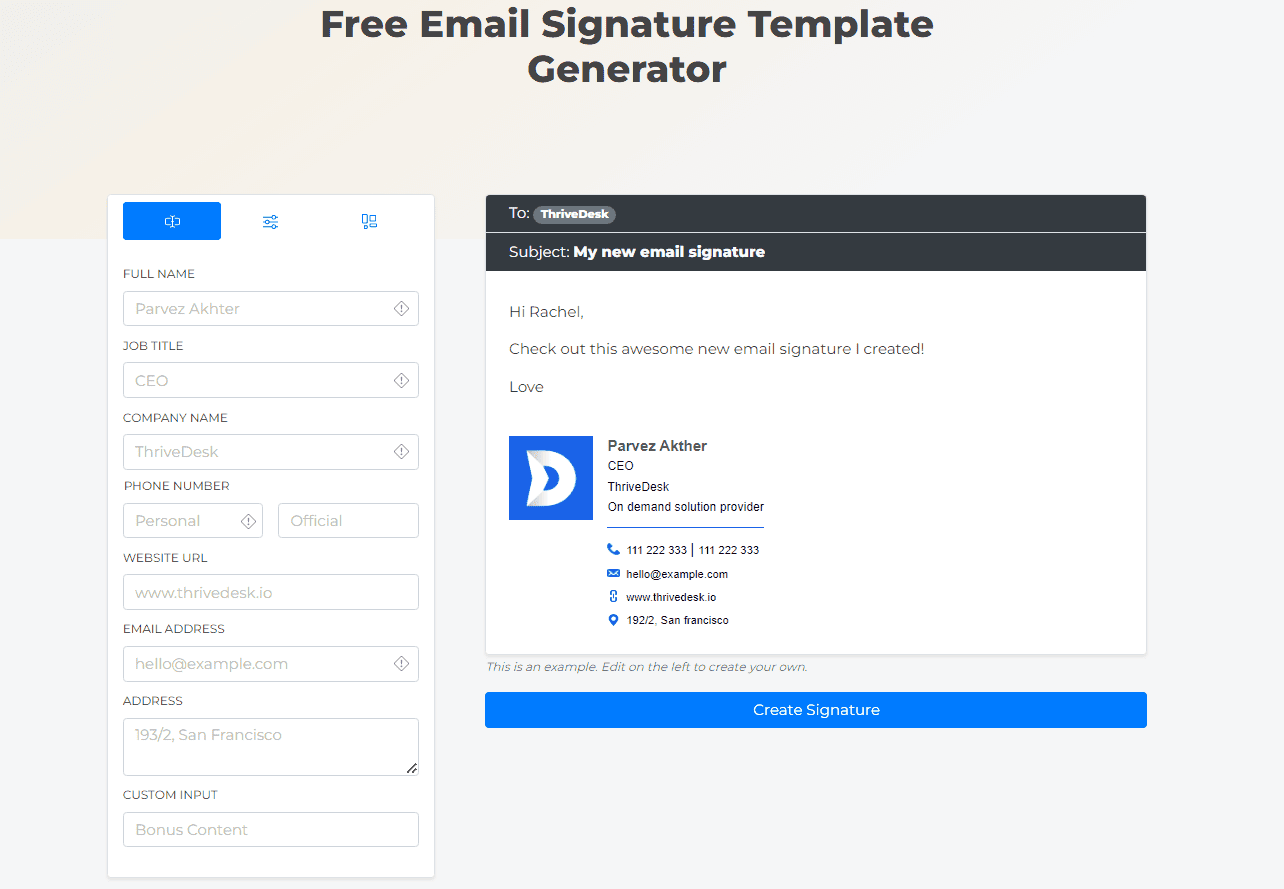
The interface is simple and intuitive. Users can build their email signature step-by-step. No technical skills are needed. The process includes:
- Selecting a template
- Adding personal details
- Customizing fonts and colors
- Previewing the signature live
This user-friendly design ensures fast, smooth signature creation for all users.
Minimalistic And Clean Design For Professional Appeal
ThriveDesk focuses on minimalism. The signatures are clean and neat. This style suits professional settings perfectly. It avoids clutter, keeping attention on key contact details.
Clear layouts and balanced spacing make emails look organized. This improves readability and leaves a positive impression on recipients.
Compatibility With Major Email Clients
ThriveDesk signatures work well with popular email platforms such as:
| Email Client | Compatibility |
|---|---|
| Gmail | Full support |
| Outlook | Full support |
| Apple Mail | Full support |
| Yahoo Mail | Full support |
Users can copy and paste their signature easily into these clients. Instructions guide the setup process, ensuring no errors.
Privacy-first Approach With No Data Capture
ThriveDesk does not capture or store user data. The signature creation happens locally on your device. This means:
- No risk of personal data leaks
- Full control over your information
- Safe and secure signature generation
This privacy-first method builds trust with users concerned about data security.
Ai-powered Signature Customization
Artificial Intelligence helps customize signatures uniquely. Users can:
- Draw or type their digital signature
- Adjust style with AI suggestions
- Get a polished, personalized look
The AI tool enhances creativity and saves time. It creates a distinct signature that stands out professionally.
How Thrivedesk Email Signature Benefits Your Brand
ThriveDesk Email Signature helps your brand stand out with ease. It creates a professional look in every email. This tool keeps your brand consistent and trustworthy. It also saves time by generating signatures automatically. Customizable features boost engagement with your audience.
Enhancing Brand Consistency Across Communications
ThriveDesk ensures every email carries your brand’s identity clearly. It uses the same logo, colors, and fonts in all signatures. This consistency builds trust and recognition. Customers see a unified message across all your emails.
- Standardized design for all team members
- Easy to update brand details anytime
- Compatible with Gmail, Outlook, Apple Mail, and Yahoo Mail
Saving Time With Real-time Signature Generation
No need to create signatures manually. ThriveDesk generates signatures instantly as you type. It reduces errors and keeps information up-to-date. The tool works without capturing personal data, ensuring privacy.
| Feature | Benefit |
|---|---|
| Automatic signature creation | Quick setup, less manual work |
| Real-time updates | Always current contact and brand info |
| Free to use | No cost for basic signature generation |
Improving Professionalism And Credibility
A clean, well-designed email signature shows professionalism. ThriveDesk adds a polished look to your emails. It includes contact info and social links neatly. This builds credibility with clients and partners.
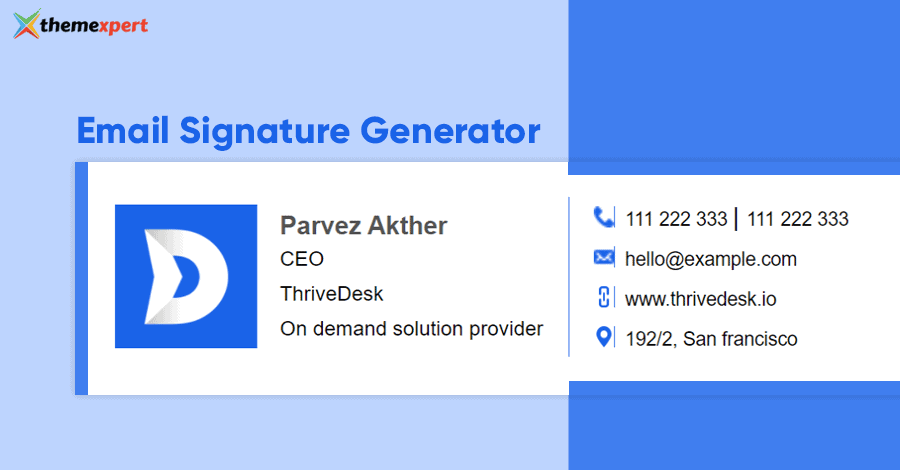
- Clear presentation of name and role
- Linked social media icons for easy access
- Legal disclaimers or confidentiality notes if needed
Boosting Engagement Through Customizable Elements
ThriveDesk lets you add custom elements to your signature. You can include calls to action, banners, or promotions. Customization helps capture attention and drives clicks.
- Clickable buttons for appointments or offers
- Personalized messages for different teams
- Integration with marketing campaigns
These features make each email more than just a message. They turn signatures into marketing tools that invite interaction.
Pricing And Affordability Breakdown
Thrivedesk Email Signature offers a cost-effective solution for creating professional email signatures. Its pricing structure suits users who want quality without extra expenses. The focus lies on accessibility and simplicity, making it ideal for various users.
Free Access To Signature Generator Tools
Thrivedesk provides a free email signature template generator that requires no data capture. Users can create, customize, and copy signatures easily.
- Works with Gmail, Outlook, Apple Mail, Yahoo Mail, and more
- Allows drawing or typing a digital signature
- Completely free with privacy-first design
This tool suits anyone needing a quick, professional signature without spending money.
Comparison With Paid Alternatives
| Feature | Thrivedesk (Free) | Paid Alternatives |
|---|---|---|
| Cost | Free | Usually $5-$15/month |
| Customization | Basic templates, signature drawing | Advanced designs, branding options |
| Data Privacy | No data capture | Varies, often data stored |
| Ease of Use | Simple and quick | May require learning time |
Thrivedesk’s free tool covers essential needs well. Paid options offer extra features but at a cost.
Value For Small Businesses And Freelancers
Small businesses and freelancers benefit greatly from Thrivedesk’s free email signature generator.
- Creates professional signatures without extra cost
- Supports multiple email clients easily
- Helps maintain brand consistency with custom signatures
- Privacy-first approach builds trust with clients
This tool fits tight budgets and avoids subscription fees. It helps users appear polished in every email.
Pros And Cons Based On Real-world Usage
ThriveDesk Email Signature offers a simple and private way to create professional email signatures. Users appreciate its ease of use and speed. Yet, some find its customization options limited. The balance of strengths and weaknesses becomes clear by examining real user experiences.
Advantages: Simplicity, Speed, And Privacy
ThriveDesk stands out for its straightforward signature generator. The tool works smoothly with popular email clients like Gmail, Outlook, Apple Mail, and Yahoo Mail.
- Simplicity: No technical skills required. Just create and copy your signature.
- Speed: Generate a ready-to-use signature in minutes.
- Privacy: No data is captured during signature creation. Users keep full control of their information.
This combination makes ThriveDesk ideal for busy professionals who want a quick, safe solution.
Limitations: Feature Depth And Customization Scope
ThriveDesk’s focus on simplicity limits advanced features. Users seeking deep customization may find it lacking.
- Limited design templates and styling options.
- Basic editing tools without advanced branding controls.
- No integration with CRM or marketing platforms for signature automation.
For complex branding needs, ThriveDesk might not meet all expectations. It works best for those prioritizing ease and privacy.
User Feedback And Ratings Overview
| Aspect | User Rating (out of 5) | Comments |
|---|---|---|
| Ease of Use | 4.8 | Users love the intuitive interface and quick setup. |
| Privacy | 4.9 | Highly rated for no data capture and safe signature creation. |
| Customization | 3.7 | Some users want more design flexibility and features. |
| Overall Satisfaction | 4.7 | Most users recommend it for simple, private email signatures. |
User reviews highlight ThriveDesk as a reliable tool. It works best for those who need quick, private signature creation without complex features.
Ideal Users And Use Cases For Thrivedesk Email Signature
ThriveDesk Email Signature suits various users and use cases. Its simplicity and privacy features make it a good choice for many professionals. The tool helps maintain brand consistency and enhances communication impact. Below are key groups who benefit most from ThriveDesk Email Signature.
Small To Medium Businesses Seeking Brand Consistency
Businesses aiming for uniform brand image across all emails find ThriveDesk useful. It offers:
- Easy creation of professional email signatures
- Consistent design for all employees
- Supports major email clients like Gmail, Outlook, and Apple Mail
Uniform signatures build trust and reinforce company identity. This strengthens customer recognition and loyalty.
Freelancers And Professionals Needing Quick Setup
Freelancers need fast, simple tools. ThriveDesk provides a free, easy-to-use signature generator. Features include:
- Create digital signatures by typing or drawing
- Quick copy and paste instructions
- No complex setup required
This saves time and adds a professional touch to emails without hassle.
Customer Support Teams Looking To Enhance Email Impact
Support teams benefit from clear, branded email signatures. ThriveDesk helps by:
| Feature | Benefit |
|---|---|
| Unified email signatures | Improves customer trust and recognition |
| Compatible with multiple platforms | Smooth integration with existing tools |
| Simple customization | Reflects brand personality and contact info |
These features enhance email communication and support professionalism.
Organizations Prioritizing Data Privacy
ThriveDesk Email Signature respects user data privacy. It:
- Creates signatures without capturing user data
- Allows offline use and copying
- Ensures no information is stored or shared
Ideal for organizations with strict privacy policies. Users stay secure while maintaining professional email appearances.
Conclusion: Boosting Brand Impact Effortlessly With Thrivedesk
ThriveDesk Email Signature simplifies building a consistent brand image. It helps create professional signatures quickly. This tool works with Gmail, Outlook, Apple Mail, Yahoo Mail, and more. The signature generator protects your data by not capturing it during creation. Users can easily copy and add signatures with clear instructions.
Using ThriveDesk ensures every email reflects your brand identity. It adds a polished, trustworthy look to your communications. This boosts brand recognition and leaves a positive impression on clients and partners.
Summary Of Key Benefits
- Free and Easy to Use: Create custom email signatures without cost or hassle.
- Privacy-Focused: No data capture during signature creation ensures security.
- Wide Compatibility: Supports all popular email clients for seamless integration.
- Professional Appearance: Enhances brand credibility with consistent, polished signatures.
- Customizable Design: Allows personalized digital signatures by typing or drawing.
- Clear Instructions: Step-by-step guidance for adding signatures to any email client.
Final Recommendations For Maximizing Signature Effectiveness
- Keep It Simple: Use a clean, readable design that matches your brand colors.
- Include Essential Info: Add your name, role, company, and contact details clearly.
- Add a Call to Action: Encourage email recipients to visit your website or social media.
- Use Consistent Fonts and Colors: Match your signature style with other brand materials.
- Test Across Devices: Check your signature’s appearance on desktop and mobile email apps.
- Update Regularly: Refresh your signature with new promotions or contact changes.
Credit: www.themexpert.com
Credit: www.thrivedesk.com
Frequently Asked Questions
What Is Thrivedesk Email Signature?
ThriveDesk Email Signature is a free, easy-to-use email signature generator. It creates professional, customizable signatures without capturing your data. It supports Gmail, Outlook, Apple Mail, and more, helping you maintain consistent branding in your emails.
How Do I Create A Signature With Thrivedesk?
Simply use ThriveDesk’s free online generator. Enter your details, customize the design, then copy the HTML code. Follow the provided instructions to add it to your preferred email client quickly and easily.
Is Thrivedesk Email Signature Generator Free?
Yes, the ThriveDesk Email Signature generator is completely free to use. It offers unlimited signature creations with no hidden fees or subscriptions. You can create, customize, and download your signature without any cost.
Can I Customize My Signature Design?
Absolutely. ThriveDesk lets you customize fonts, colors, layout, and social media icons. Its minimalistic design ensures your signature looks clean and professional while matching your brand style.
Conclusion
Thrivedesk Email Signature helps you create clean, professional signatures fast. It works with popular email platforms like Gmail and Outlook. The tool is easy to use, requiring no special skills. It keeps your data private while designing your signature. Adding a personalized touch to emails improves communication and trust.
Try ThriveDesk to simplify your email branding effortlessly. A simple signature makes your emails look polished and consistent. This small step can boost your business image every day.
Related Articles: Thrivedesk Lifetime Deal| Thrivedesk Features| Thrivedesk Benefits| Thrivedesk For Small Business| Buy Thrivedesk