
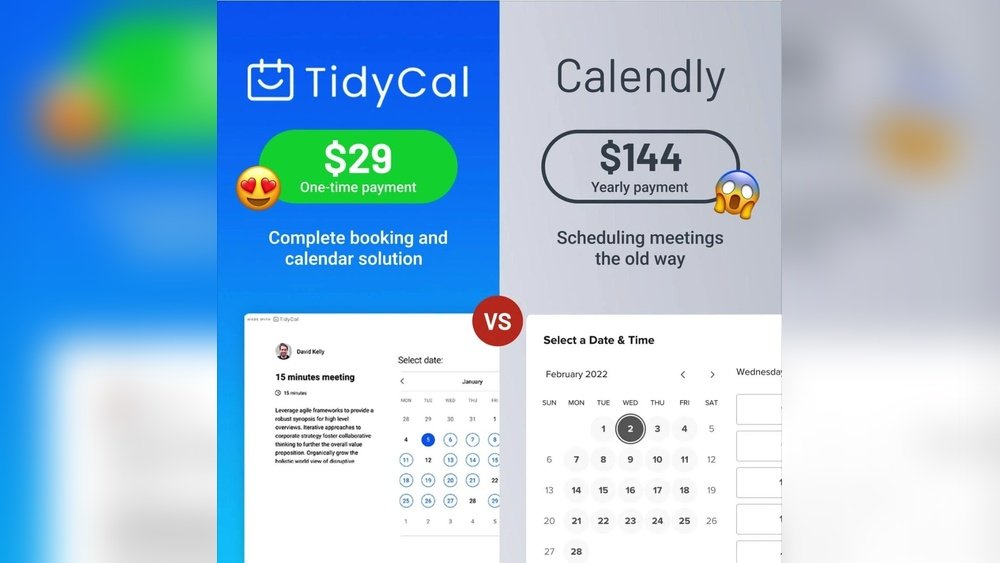
Are you struggling to choose the right scheduling tool for your business or personal use? You’ve probably heard about both platforms, and this TidyCal Vs Calendly comparison will help you understand which one truly fits your workflow. Both tools promise to make booking appointments a breeze, but their features, pricing, and ease of use can differ depending on your needs. This guide breaks everything down so you can choose with confidence.
But which one truly fits your needs? Whether you want something simple and budget-friendly or a platform that offers more flexibility and customization, this comparison will help you see the clear differences. Stick around, because by the end of this article, you’ll know exactly which tool will save you time, reduce scheduling headaches, and impress your clients or contacts.
Ready to find your perfect match? Let’s dive into Tidycal vs Calendly.

Credit: zapier.com
Introduction To Tidycal And Calendly
Scheduling tools help save time and reduce confusion. TidyCal and Calendly are two popular options. Both allow users to book meetings easily online. Each serves different users and needs. Understanding their strengths helps pick the right tool.
Overview Of Tidycal: Purpose And Target Audience
TidyCal is a simple, budget-friendly scheduling app. It suits freelancers, small business owners, and solopreneurs. The tool focuses on ease of use and affordability.
- Offers basic scheduling features without complexity
- Supports multiple meeting types and time zones
- Provides a clean, minimal interface
- Ideal for those with straightforward booking needs
TidyCal appeals to users wanting a clear, no-frills calendar solution. It fits well for those new to online scheduling or with small client lists.
Overview Of Calendly: Purpose And Target Audience
Calendly targets a broader audience. It suits individuals, teams, and large businesses. The platform offers advanced features and customization.
- Supports complex scheduling workflows
- Integrates with many apps and calendars
- Allows team scheduling and round-robin assignments
- Provides branding and customization options
Calendly is best for users needing flexibility and scalability. It helps create a seamless client experience at any business size.
Why Comparing Tidycal And Calendly Matters For Scheduling
Choosing the right scheduler saves time and avoids frustration. TidyCal and Calendly both simplify booking but differ in scope.
| Aspect | TidyCal | Calendly |
|---|---|---|
| Best for | Freelancers, small businesses | Teams, enterprises, varied needs |
| Features | Basic scheduling, easy setup | Advanced workflows, integrations |
| Price | Affordable, free option | Free plan plus premium tiers |
| Customization | Minimal | Extensive |
Understanding these differences helps match the tool to your scheduling needs. This ensures smoother appointments and better time management.

Credit: https://www.youtube.com/watch?v=LxQUHItbIME
Key Features That Set Tidycal And Calendly Apart
Both TidyCal and Calendly offer strong scheduling tools. They share many core features but differ in key areas. These differences affect pricing, ease of use, customization, and integrations. Understanding these features helps choose the best fit.
Tidycal’s Simplicity And Cost-effective Pricing Model
TidyCal focuses on simplicity and affordability. It provides an easy-to-use interface that suits small businesses and freelancers. The clean design reduces learning time.
- Clear, straightforward scheduling options
- Minimal setup required
- Cost-effective pricing tailored for budget-conscious users
This makes TidyCal ideal for users who want a quick solution without extra complexity.
Calendly’s Flexibility And Scalability For Growing Businesses
Calendly supports businesses that need more features as they grow. It handles complex scheduling needs with ease.
- Multiple event types and team scheduling
- Advanced rules for availability and reminders
- Supports larger teams and volume booking
These features help businesses scale their scheduling smoothly without switching tools.
Mobile Accessibility: Calendly’s Advantage On The Go
Calendly offers strong mobile support. Its apps and mobile-friendly design allow users to manage schedules anywhere.
- Dedicated iOS and Android apps
- Responsive mobile website
- Push notifications and reminders
TidyCal lacks dedicated mobile apps, making Calendly better for users who work on the move.
Customization Options: How Calendly Enhances User Experience
Calendly provides extensive customization. Users can tailor scheduling pages and emails to match branding and style.
- Custom branding with logos and colors
- Personalized confirmation and reminder messages
- Custom questions for invitees during booking
This flexibility improves client experience and professionalism.
Tidycal’s One-time Payment Feature: Lifetime Access Benefits
TidyCal stands out with its one-time payment plan. Users pay once and get lifetime access.
| Feature | TidyCal | Calendly |
|---|---|---|
| Payment Model | One-time payment | Subscription (monthly or yearly) |
| Access Duration | Lifetime | Active subscription period |
This model suits users wanting long-term savings without recurring fees.
Integration Capabilities: Calendly’s Ecosystem Connectivity
Calendly excels in connecting with other apps and services. Its broad integrations help automate workflows.
- Syncs with Google, Outlook, and Apple calendars
- Integrates with Zoom, Microsoft Teams, and Google Meet
- Supports Zapier, Salesforce, Slack, and payment gateways
TidyCal offers fewer integrations, limiting automation and connectivity.
Pricing And Affordability Breakdown
Choosing the right scheduling tool depends heavily on pricing and value. Both TidyCal and Calendly offer plans that suit different budgets and needs. Understanding their pricing structures helps solopreneurs and small teams make smart decisions. This section breaks down each tool’s costs and what you get for your money.
Tidycal’s Pricing Structure And Value For Solopreneurs
TidyCal targets solopreneurs and small business owners with a simple and affordable pricing model.
- One low monthly fee covers all core features.
- No confusing tiers or add-ons.
- Includes unlimited bookings and calendar integrations.
- Easy to set up and use, saving time.
TidyCal’s straightforward pricing brings clear value. It suits individuals who want solid scheduling without extra costs or hidden fees.
Calendly’s Tiered Pricing And Features At Each Level
Calendly offers a tiered pricing plan with increasing features at each level.
| Plan | Price (per month) | Main Features |
|---|---|---|
| Free | $0 | Basic scheduling, 1 calendar connection, limited event types |
| Essentials | $10 | Multiple event types, integrations, reminders |
| Professional | $15 | Advanced integrations, payment collection, custom branding |
| Teams | $30 | Team scheduling, round robin, analytics |
Calendly’s plans fit growing businesses needing more features and team options.
Comparing Free Plans: What You Get Without Paying
Both tools offer free plans but with different limits.
- TidyCal Free: Unlimited bookings, 1 calendar per user, basic scheduling features.
- Calendly Free: 1 calendar connection, limited event types, no integrations.
TidyCal’s free plan offers more bookings and simpler setup. Calendly’s free plan is good for basic individual use but limits customization.
Cost-effectiveness: Which Tool Offers Better Roi?
Return on investment depends on your needs.
- TidyCal saves money with all features in one simple plan.
- Calendly provides more advanced tools but costs more as you upgrade.
- Solopreneurs benefit from TidyCal’s clear, low-cost model.
- Teams needing advanced options may find Calendly worth the higher price.
Choosing the tool with the best ROI means matching features to your business size and scheduling demands.
Pros And Cons Based On Real-world Usage
Choosing the right scheduling tool impacts daily workflow and client interactions. Both TidyCal and Calendly offer unique benefits and some limitations. Understanding their real-world pros and cons helps pick the best fit for your needs. Below is a detailed look at their strengths and weaknesses.
Advantages Of Using Tidycal For Simple Scheduling Needs
TidyCal shines for users needing straightforward scheduling without extra complexity. It offers:
- Easy setup and clean interface for quick bookings
- Cost-effective pricing, making it ideal for small businesses
- Essential scheduling features like calendar syncing and booking links
- Lightweight tool with minimal distractions or unnecessary options
This simplicity suits freelancers, consultants, and small teams who want to save time.
Limitations Of Tidycal Compared To More Robust Tools
TidyCal lacks advanced features found in bigger platforms. Some drawbacks include:
- Limited customization for booking pages
- Fewer integration options with third-party apps and tools
- No advanced automation or workflow support
- Basic reporting and analytics capabilities
Users needing complex scheduling or extensive client management may find TidyCal too basic.
Strengths Of Calendly In Customization And Integration
Calendly offers powerful customization and integration features. Key strengths are:
- Highly customizable booking pages and notifications
- Wide range of integrations with apps like Zoom, Salesforce, and Google Calendar
- Automation options to streamline scheduling workflows
- Advanced reporting tools to track meeting trends
- Scalable plans suitable for growing businesses and teams
These features make Calendly a versatile choice for businesses seeking detailed control.
Potential Drawbacks Of Calendly For Small Businesses
Calendly’s rich feature set can overwhelm small users. Common challenges include:
- Higher price points compared to simpler tools like TidyCal
- More complex setup requiring time to learn
- Some features locked behind premium plans
- May offer more than necessary for basic scheduling needs
Small businesses or solo entrepreneurs may prefer simpler, cheaper solutions.
Ideal Users And Use Case Recommendations
Choosing the right scheduling tool depends on your needs and team size. Both TidyCal and Calendly offer strong features but serve different audiences. Understanding who benefits most from each platform helps in making the best choice.
Who Should Choose Tidycal: Solopreneurs And Budget-conscious Users
TidyCal is perfect for solopreneurs and those who want to keep costs low. It offers essential scheduling features without complex extras. The platform is easy to use and does not overwhelm with options.
- Ideal for freelancers and solo business owners
- Low-cost or free plans available
- Straightforward setup and interface
- Good for simple, direct booking needs
Who Should Opt For Calendly: Growing Teams And Enterprises
Calendly suits growing teams and enterprises needing advanced features. It scales well with team size and offers many customization options. The platform supports multiple calendars and complex workflows.
- Best for teams requiring coordination
- Supports multiple users and roles
- Offers advanced integrations and automation
- Customizable booking rules and workflows
Best Scenarios For Tidycal: Simple, One-off Appointments
TidyCal works well for simple scheduling tasks. It fits appointments that do not need complex rules or team coordination. The tool shines in managing one-off meetings or single calendar bookings.
- Client consultations or coaching sessions
- Freelance project meetings
- Personal appointments without team involvement
- Quick scheduling without extra features
Best Scenarios For Calendly: Complex Scheduling And Team Coordination
Calendly excels in complex scheduling. It supports group meetings, round-robin assignments, and multiple team members. This makes it fit for businesses with many users and varied booking needs.
| Use Case | Calendly Features |
|---|---|
| Team meetings and coordination | Shared calendars, team scheduling, round-robin |
| Automated workflows | Custom reminders, follow-ups, and integrations |
| Multiple event types | Different booking forms and rules per event |
| Enterprise-level use | Advanced admin controls and security |
Conclusion: Making The Right Scheduling Choice
Choosing between Tidycal and Calendly depends on your unique scheduling needs. Both tools simplify booking appointments but differ in features, flexibility, and cost. Understanding these differences helps you pick the best fit for your workflow.
Summary Of Key Differences And Strengths
| Feature | Tidycal | Calendly |
|---|---|---|
| Pricing | Low-cost, with a strong free plan | Higher price, more tier options |
| Customization | Basic customization | Highly customizable scheduling links and workflows |
| Scalability | Best for individuals and small teams | Suitable for growing businesses and large teams |
| Integrations | Limited integrations | Wide range of third-party integrations |
| User Experience | Simple and straightforward | Flexible but slightly more complex |
How To Align Your Scheduling Needs With The Right Tool
Start by listing what matters most for your scheduling:
- Budget: Choose Tidycal for affordability and basic needs.
- Customization: Pick Calendly if you want detailed control over booking options.
- Team Size: Small teams or solo users benefit from Tidycal’s simplicity.
- Growth Plans: Calendly supports larger teams and complex workflows.
- Integration Needs: Calendly fits better if you need many app connections.
Match these needs clearly before deciding.
Final Thoughts: Balancing Features, Cost, And Usability
Both tools serve scheduling well but suit different users.
Tidycal offers a cost-effective and easy solution. It works well for freelancers and small businesses focused on simplicity.
Calendly provides more features and flexibility. Ideal for those needing advanced options and team coordination.
Consider what matters most: saving money, ease of use, or advanced capabilities. Your choice should reflect your current needs and future plans.

Credit: affdigital-review.com
Frequently Asked Questions
What Is The Difference Between Calendly And Tidycal?
Calendly offers more customization, scalability, and integrations for businesses. TidyCal is simpler, cost-effective, and ideal for solopreneurs with lifetime access.
Is There Anything Better Than Calendly?
Several tools like Acuity Scheduling, Microsoft Bookings, and Doodle excel in specific areas beyond Calendly. Free options include TidyCal and Zcal. The best choice depends on your scheduling needs, budget, and required features.
How Much Does Tidycal Cost?
TidyCal costs $39 for a one-time payment, granting lifetime access to all features. It offers a budget-friendly alternative to subscription-based schedulers.
What Is Tidycal Used For?
TidyCal is used for simple, affordable online scheduling and appointment booking. It helps solopreneurs manage meetings efficiently.
Conclusion
Both Tidycal and Calendly help schedule meetings easily. Tidycal offers simple, budget-friendly options for small users. Calendly provides more features and flexibility for growing businesses. Choose based on your needs and budget. Trying both can show which fits your style best.
Scheduling made easy—pick the tool that works for you.