
Are you tired of spending hours fixing mistakes on your WordPress site or testing new themes and plugins only to get stuck in a mess? The WP Reset Plugin Free could be your game-changer.
It lets you quickly reset your entire WordPress website back to its default state without touching your files. Imagine having a clean slate in just a few clicks, no more complicated manual resets or fear of losing important data. Whether you’re a developer or a site owner, WP Reset makes troubleshooting and experimenting easy and stress-free.
Keep reading to discover how this powerful, user-friendly tool can save you time and headaches on your website journey.
Credit: wordpress.org
Introduction To Wp Reset Plugin Free
WP Reset Plugin Free is a powerful tool designed to simplify managing WordPress sites. It helps users reset their websites quickly and safely. This tool is perfect for developers, designers, and site owners who want a fresh start without reinstalling WordPress.
The plugin restores the database to its default settings while keeping the files intact. It removes all custom content, themes, and plugins, making the site like new. This feature saves time and effort, especially during development or troubleshooting.
What Is Wp Reset Plugin And Its Core Purpose
WP Reset Plugin is a WordPress tool that resets your website’s database. It returns the database to default installation values without deleting any core WordPress files.
- Deletes all posts, pages, comments, and customizations
- Leaves media files and WordPress system files untouched
- Speeds up debugging and testing
The core purpose is to help users quickly start fresh. It is helpful for developers testing themes or plugins. It also aids in fixing errors caused by faulty settings or plugins.
Why WordPress Users Need A Reset Tool
WordPress users often face issues with broken sites or faulty plugins. Manually fixing these problems can be time-consuming and complex. WP Reset makes this process simpler and faster.
- Quickly removes all unwanted changes
- Allows safe testing of new themes and plugins
- Prevents the need to reinstall WordPress
- Helps recover from configuration errors
- Ideal for developers to test in clean environments
This plugin reduces frustration and saves time. It keeps the website files safe while resetting the database.
Overview Of The Free Version: Who Can Benefit
The free version of WP Reset offers essential features suitable for many users. It is ideal for:
- Beginners who want to clean up their site
- Developers needing a fast reset tool
- Designers testing new layouts or plugins
- Site owners fixing errors without full reinstall
Key features in the free version include:
| Feature | Description |
|---|---|
| Database Reset | Restores database to default settings |
| Safe Mode | Prevents accidental resets by confirming actions |
| Snapshots | Take backups before resetting (basic) |
| Selective Reset | Reset specific parts like plugins or themes |
The free version covers most daily needs. It offers a clean, simple way to start fresh without losing important files.
Key Features Of Wp Reset Plugin Free
WP Reset Plugin Free offers essential features that simplify WordPress management. It helps users quickly restore their website’s database and settings to default states. These features improve workflow for developers and site owners alike. The plugin balances power with ease of use, making complex tasks straightforward.
Instant Database Reset: Simplifying WordPress Restoration
The Instant Database Reset feature allows users to reset their entire WordPress database to default values fast. This process removes all custom content and settings without affecting core files.
- Resets database tables to original installation state
- Deletes posts, pages, users, and settings
- Preserves WordPress files and plugins
- Completes reset in seconds with one click
This feature is perfect for testing environments and quick recovery from errors.
Selective Reset Options: Tailoring Your Site Reset
WP Reset lets users choose specific parts of the site to reset. This selective control prevents unnecessary data loss.
| Reset Option | Description |
|---|---|
| Posts and Pages | Remove all content but keep themes and plugins intact |
| Themes and Plugins | Reset active themes or deactivate plugins without deleting files |
| Media Library | Clear all uploaded images and files selectively |
| Custom Database Tables | Reset or preserve custom tables created by plugins |
This flexibility helps maintain useful data while cleaning unwanted elements.
Safety Net Features: Protecting Your Data During Resets
Safety is a priority in WP Reset. The plugin includes features to protect data during resets.
- Snapshots: Take a full backup before resetting
- Auto Restore: Quickly revert if mistakes occur
- Confirmation Prompts: Prevent accidental resets
These safeguards minimize risks and give users confidence in using reset functions.
User-friendly Interface: Making Complex Tasks Easy
The plugin’s interface is clean and simple. It guides users through reset steps clearly.
- Intuitive dashboard with clear reset options
- Step-by-step instructions for each feature
- Minimal technical jargon, ideal for beginners
- Fast navigation and responsive design
Users save time and avoid confusion during site management tasks.
Compatibility And Integration With Themes And Plugins
WP Reset works seamlessly with almost all WordPress themes and plugins.
- Does not delete or alter theme/plugin files
- Resets settings without breaking integrations
- Supports custom plugins and advanced setups
- Regular updates ensure compatibility with WordPress versions
This makes it reliable for diverse WordPress environments.
How Wp Reset Plugin Free Enhances WordPress Management
WP Reset Plugin Free simplifies managing WordPress sites by quickly restoring settings and data. It removes custom changes without touching core files, making site management smoother. This tool suits developers, testers, and site owners who want fast fixes and clean slates.
Its ability to reset the database to default values speeds up tasks and helps avoid time-consuming manual cleanups. Users regain control after errors, glitches, or unwanted changes. The plugin also supports better workflows for development and troubleshooting.
Speeding Up Development And Testing Workflows
WP Reset accelerates development by allowing instant reset of WordPress to a clean state. Developers can:
- Test themes and plugins repeatedly without reinstalling WordPress
- Reset site data in seconds to check changes or fixes
- Avoid manual database cleanup steps
This quick reset feature reduces downtime and helps maintain focus on coding and testing. It supports both beginners and experts in a hassle-free environment.
Easing Troubleshooting By Removing Customizations
Customizations sometimes cause site errors or conflicts. WP Reset removes all custom changes, including:
- Plugin and theme settings
- Content and users
- Database entries
It leaves core WordPress files untouched. This process isolates issues by restoring the site to default settings. Troubleshooting becomes faster and less confusing.
Recovering Quickly From Site Errors And Glitches
Site errors or glitches disrupt user experience and workflows. WP Reset helps recover fast by:
- Clearing corrupted data
- Restoring default database state
- Removing faulty plugins or themes
It prevents the need for full site reinstallations. Recovery takes seconds, minimizing downtime and data loss risks.
Streamlining Site Cleanup Before Launch Or Redesign
Before launching or redesigning, cleaning up the site is crucial. WP Reset enables:
| Cleanup Task | WP Reset Benefit |
|---|---|
| Remove test data | Deletes posts, pages, and customizations fast |
| Clear user accounts | Resets users except admin |
| Reset plugins/themes | Returns settings to defaults without reinstalling |
This streamlines final preparations and ensures a fresh, error-free start. WP Reset saves time and effort during site cleanup.
Credit: wpmarmite.com
Pricing And Affordability Breakdown
Wp Reset offers a free version that suits many users’ needs. Understanding the pricing helps decide if the free plugin fits your requirements or if upgrading is needed. This section explores the free version’s features, compares it with the Pro version, and evaluates cost-effectiveness for different users.
What The Free Version Includes: Features And Limitations
The free Wp Reset plugin resets your WordPress database quickly. It restores the site to default installation values without touching core files. This means:
- Deletes all custom content and settings
- Leaves WordPress files intact
- Simple, fast reset process
Limitations include fewer advanced tools and automation options compared to Pro. It lacks features like snapshots, automatic backups, and multisite support.
Comparing Free Vs. Pro Versions: Is Upgrade Necessary?
| Feature | Free Version | Pro Version |
|---|---|---|
| Basic Reset | Included | Included |
| Snapshots (backups) | No | Yes |
| Automatic Reset Triggers | No | Yes |
| Multisite Support | No | Yes |
| Priority Support | No | Yes |
The Pro version adds advanced features for developers and agencies. For casual users, the free version often suffices. Developers or frequent testers may find the upgrade useful.
Cost-effectiveness For Individual Users And Developers
Individual users benefit from the free plugin’s core reset functions without cost. It supports basic website cleanup and testing needs efficiently.
Developers gain value from Pro’s automation and snapshot features. These reduce manual work and improve workflow speed.
- Free version: Zero cost, limited but essential features
- Pro version: Paid, designed for professional use and bulk tasks
The choice depends on how often resets happen and the need for backup safety. For simple use, the free plugin is highly affordable and practical.
Pros And Cons Based On Real-world Usage
Wp Reset Plugin Free offers a quick way to reset WordPress sites to their default state. Users appreciate its ability to clear customizations and content without affecting files. This section explores the plugin’s strengths and weaknesses, based on real user experiences and practical use.
Advantages: Efficiency, Ease Of Use, And Safety
- Efficiency: Resets the WordPress database instantly to default values.
- Ease of Use: Simple interface suitable for beginners and non-developers.
- Safety: Does not delete WordPress files, reducing risk of site damage.
- Debugging Aid: Helps developers quickly test themes and plugins by resetting site data.
- Selective Reset: Options to reset specific parts of the site, such as posts or plugins.
These features make Wp Reset a reliable tool for cleaning up WordPress installations without complications.
Limitations: Feature Restrictions And Potential Challenges
| Limitation | Impact |
|---|---|
| Free Version Limits | Some advanced reset options are only in paid versions. |
| Risk of Data Loss | Resetting deletes all content and customizations permanently. |
| Learning Curve | Users must understand reset effects before using it. |
Users should back up their sites before using the plugin to avoid irreversible data loss.
User Feedback And Common Experiences
Most users report positive experiences with Wp Reset for quick site refreshes. They praise its speed and simplicity. Common points include:
- Helpful for developers: Speeds up testing cycles for themes and plugins.
- Clear UI: Minimalist design reduces confusion.
- Occasional confusion: Some users find reset options unclear at first.
- Backup necessity: Many recommend creating backups before reset.
The plugin is favored in website development tools for its practical approach to resetting WordPress installations safely.
Ideal Users And Use Cases For Wp Reset Plugin Free
WP Reset Plugin Free serves a wide range of WordPress users. It is designed to simplify database resets and site restorations. The plugin is perfect for those who need a quick, reliable way to start fresh. Its features suit different roles, from beginners to developers and administrators. Below, we explore who benefits most and how they use this tool effectively.
WordPress Beginners And Non-developers
Beginners and non-developers often face challenges with site errors and unwanted changes. WP Reset helps by quickly restoring the site to default settings. Users can:
- Undo mistakes without technical skills.
- Remove unwanted plugins or themes safely.
- Start over with a clean WordPress installation.
This plugin removes all content and settings but keeps files intact. Beginners gain confidence by experimenting without risk.
Theme And Plugin Developers Testing Environments
Developers need to test themes or plugins repeatedly. WP Reset speeds up this process by:
- Resetting the database instantly to a default state.
- Saving time on manual cleanup after tests.
- Allowing safe testing without affecting live data.
It creates a controlled environment, helping developers debug and improve their work faster.
Site Administrators Managing Frequent Changes
Administrators often manage sites with frequent updates and changes. WP Reset supports their workflow by:
- Resetting the site after updates or experiments.
- Removing all customizations quickly to avoid conflicts.
- Saving backups before resets to prevent data loss.
This plugin ensures smooth management and quick recovery from errors or failed updates.
Educational And Training Scenarios For WordPress
In classrooms or workshops, WP Reset is a valuable tool for trainers. It allows instructors to:
- Reset student sites after lessons.
- Provide a clean slate for practice exercises.
- Demonstrate WordPress features without permanent changes.
Students learn by doing, with the freedom to experiment safely. Trainers save time by avoiding manual cleanup.
Getting Started With Wp Reset Plugin Free
WP Reset Plugin Free is a simple tool for WordPress users. It helps reset your website’s database quickly. This plugin restores your site to its default settings. You keep your files safe while removing content and customizations.
This section shows how to install, reset, and use the plugin wisely. Follow the steps to avoid losing important data.
Installation And Setup Guide
Start by installing WP Reset from the WordPress plugin directory. The process is fast and easy:
- Go to your WordPress dashboard.
- Click Plugins > Add New.
- Search for WP Reset.
- Click Install Now and then Activate.
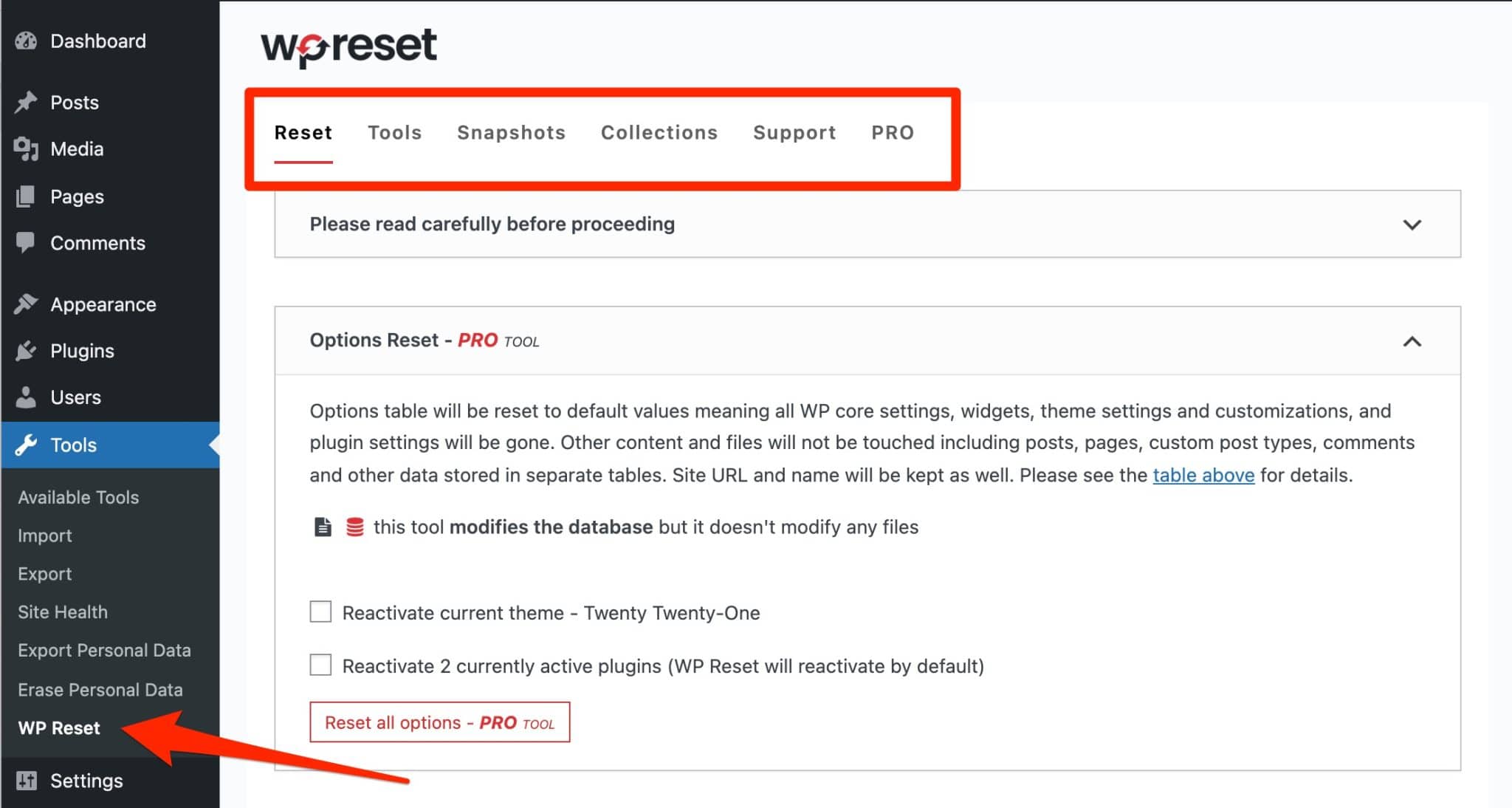
Once activated, find the WP Reset menu in your dashboard sidebar. Open it to access the plugin’s features.
Step-by-step Walkthrough Of Resetting Your Site
Resetting your WordPress site with WP Reset is straightforward. Follow these steps carefully:
- Navigate to WP Reset in the dashboard.
- Read the warning messages carefully.
- Type the word
resetin the confirmation box. - Click the Reset Site button.
The plugin clears all posts, pages, and customizations. Your plugins and themes remain installed but deactivated. This saves time when rebuilding or testing your site.
Best Practices To Avoid Data Loss
Resetting removes content permanently. Protect your data with these tips:
- Backup your site before resetting. Use plugins or hosting backups.
- Export important data like posts or settings.
- Double-check the confirmation box before clicking reset.
- Test the plugin on a staging site, not on a live site.
- Keep your WordPress and plugins updated for best security.
Following these practices keeps your work safe while using WP Reset.

Credit: https://www.youtube.com/watch?v=OaYcb4apNQk
Conclusion: Is Wp Reset Plugin Free The Right Choice?
The WP Reset Plugin Free offers a simple way to restore WordPress sites quickly. It helps users remove all content and settings safely without touching files. This tool suits developers and site owners who need fast resets during testing or troubleshooting.
Choosing the right plugin depends on your needs for site management and ease of use. WP Reset’s free version provides essential features that many find practical and reliable.
Summary Of Key Benefits And Considerations
- Fast and Safe Reset: Clears the database to default settings instantly.
- User-Friendly Interface: Simple controls for beginners and professionals alike.
- Selective Reset Options: Choose specific components or full reset as needed.
- Ideal for Development: Speeds up debugging and testing of themes or plugins.
- Free Access: Core features available without cost, suitable for basic use.
- Limited Advanced Features: Some premium capabilities require paid versions.
- Data Loss Warning: Reset deletes content permanently; backup recommended.
Final Thoughts On Enhancing WordPress Site Management
WP Reset Plugin Free simplifies site management by offering a quick reset solution. It reduces downtime and effort in restoring WordPress environments. The tool fits well with developers and users who test often or need clean setups.
Its straightforward design helps users avoid confusion and errors. For those needing occasional resets or troubleshooting help, this plugin is a practical choice. It supports better control over WordPress maintenance tasks.
Careful use is essential to prevent accidental data loss. Always back up important information before resetting. The plugin balances power and ease, making WordPress site management smoother.
Frequently Asked Questions
What Is Wp Reset Plugin Free?
WP Reset Plugin Free quickly resets your WordPress database to default settings. It removes all custom content without affecting files. This tool is ideal for developers and site owners needing a fresh start safely and efficiently.
How Does Wp Reset Plugin Free Work?
WP Reset restores your WordPress site’s database to its original state. It deletes posts, pages, and settings while keeping core files intact. This ensures a clean slate for testing or troubleshooting without manual effort.
Is Wp Reset Plugin Free Safe To Use?
Yes, WP Reset Plugin Free is safe when used properly. It only resets the database and does not delete essential WordPress files. Always back up your site before resetting to avoid data loss.
Can Wp Reset Plugin Free Help In Debugging?
Absolutely. WP Reset Plugin Free helps developers by quickly restoring default settings. It removes conflicting data and customizations that may cause errors, speeding up the debugging process.
Conclusion
WP Reset Plugin Free offers a simple way to restore your WordPress site. It clears your database quickly without affecting core files. Developers and beginners find it useful for testing and fixing issues. The tool saves time by removing unwanted data in seconds.
You control what resets and what stays on your site. This plugin keeps website development smooth and hassle-free. Try WP Reset to manage your WordPress site with ease.
Related Articles: WP Reset Pro Nulled| WP Reset Lifetime License| WP Reset Vs Competitors| WP Reset Alternatives| WP Reset Download